Tools for download
FX Blue EACopy
EACopy simplifies the process of distributing new versions of .ex4 files across multiple instances of MT4. You simply put the new file(s) in one central place, and EACopy then transfers them into any number of different MT4 installations on your computer.
Download for Your Platform
Our installer, and also some of our individual tools, require v4.8 of the Microsoft .NET Framework. This may not be installed by default on some VPSes.
MT 4
EACopy simplifies the process of copying files into multiple installations of MT4. You can use it to copy an EA or indicator into multiple instances of MT4, or to copy .fxt files for backtesting, or to copy chart files or templates etc.
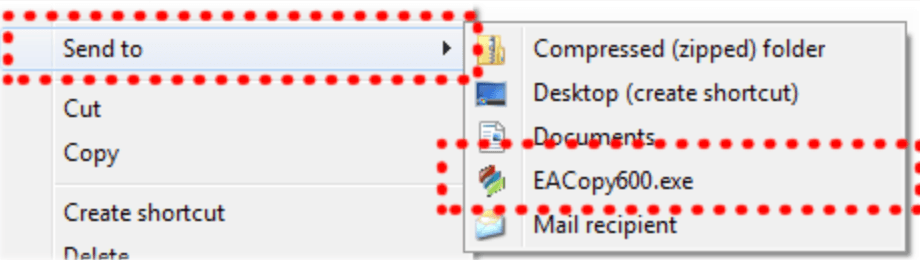
For example, you can copy an indicator or EA into multiple MT4 installations simply by right-clicking over it in Windows Explorer; choosing EACopy600 from the Send To list; and then choosing which installations of MT4 to copy into.
You can create stored lists of MT4 installations so that e.g. you can quickly copy files into either your demo MT4 installations or your live installations.
EACopy can also be used for distributing other types of files between MT4 installations: .fxt history data for backtesting, templates, symbol sets etc.
For example, you can copy an indicator or EA into multiple MT4 installations simply by right-clicking over it in Windows Explorer; choosing EACopy600 from the Send To list; and then choosing which installations of MT4 to copy into.
You can create stored lists of MT4 installations so that e.g. you can quickly copy files into either your demo MT4 installations or your live installations.
EACopy can also be used for distributing other types of files between MT4 installations: .fxt history data for backtesting, templates, symbol sets etc.
MT 5
EACopy simplifies the process of copying files into multiple installations of MT5. You can use it to copy an EA or indicator into multiple instances of MT5, or to copy chart files or templates etc.
For example, you can copy an indicator or EA into multiple MT5 installations simply by right-clicking over it in Windows Explorer; choosing EACopyMT5 from the Send To list; and then choosing which installations of MT5 to copy into.
You can create stored lists of MT5 installations so that e.g. you can quickly copy files into either your demo MT5 installations or your live installations. EACopy can also be used for distributing other types of files between MT5 installations: templates, symbol sets etc.
For example, you can copy an indicator or EA into multiple MT5 installations simply by right-clicking over it in Windows Explorer; choosing EACopyMT5 from the Send To list; and then choosing which installations of MT5 to copy into.
You can create stored lists of MT5 installations so that e.g. you can quickly copy files into either your demo MT5 installations or your live installations. EACopy can also be used for distributing other types of files between MT5 installations: templates, symbol sets etc.

Explore and Download Our Other Tools
The Alert Forwarder enhances both MT4 and MT5 by adding email, SMS, Twitter, and push-notification alerts to EAs and indicators that lack built-in notification capabilities. For example, if an EA or indicator generates an on-screen alert, the Alert Forwarder can convert it into an email or push notification.
QuickChannel is a library for sending messages between copies of MT4 running on the same computer (or between EAs/scripts running in the same installation of MT4). QuickChannel can deliver messages in less than 1 millisecond.
The MyTrader app suite gives you unrivalled trading power and information inside the MT4 and MT5 desktop client terminal: currency strength, quote board and deal tickets, trade grid and card view, real-time sentiment, market scanner, calculators, premium charting.