Tools for download
FX Blue Renko Indicator
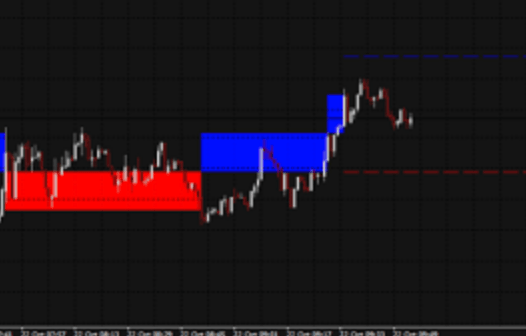
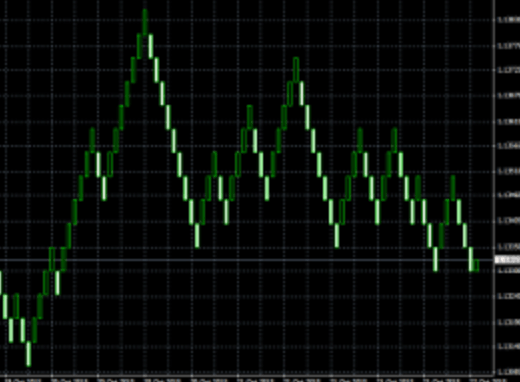
The Renko bar indicator draws Renko blocks on a normal MT4 time-based chart. The blocks can either be drawn as continuous, or as separated elements whenever a new Renko block is completed. he indicator can also be used to create an offline MT4 chart containing only the Renko blocks - a more traditional Renko chart which is not time-based like a normal MT4 chart.
Download for Your Platform
Our installer, and also some of our individual tools, require v4.8 of the Microsoft .NET Framework. This may not be installed by default on some VPSes.
The Renko bar indicator draws Renko blocks on a normal MT4 time-based chart. The blocks can either be drawn as continuous, or as separated elements whenever a new Renko block is completed. (The blocks have varying widths, or gaps between them, because Renko bars are not time-based and have varying durations).
The indicator can also be used to create an offline MT4 chart containing only the Renko blocks - a more traditional Renko chart which is not time-based like a normal MT4 chart
MT 4
The Trader Sentiment indicator shows FX Blue's trader sentiment within MT4, letting you compare changes in sentiment to changes in price. It can help to identify reaction to market news, divergence between trading activity versus current price, and potential areas of support and resistance.
This is the MT4 version of the Sentiment Indicator. An MT5 version is also available.
Please note that you need an account with FX Blue Live both to download the indicator and to use it. Your FX Blue username and password need to be entered as parameters for the indicator.
The indicator is supplied with a PDF document containing full instructions on how to install the indicator, change its settings, and interpret its data.
This is the MT4 version of the Sentiment Indicator. An MT5 version is also available.
Please note that you need an account with FX Blue Live both to download the indicator and to use it. Your FX Blue username and password need to be entered as parameters for the indicator.
The indicator is supplied with a PDF document containing full instructions on how to install the indicator, change its settings, and interpret its data.
MT 5
The Trader Sentiment indicator shows FX Blue's trader sentiment within MT5 (32-bit or 64-bit), letting you compare changes in sentiment to changes in price. It can help to identify reaction to market news, divergence between trading activity versus current price, and potential areas of support and resistance.
This is the MT5 version of the Sentiment Indicator. An MT4 version is also available.
Please note that you need an account with FX Blue Live both to download the indicator and to use it. Your FX Blue username and password need to be entered as parameters for the indicator.
The indicator is supplied with a PDF document containing full instructions on how to install the indicator, change its settings, and interpret its data.
This is the MT5 version of the Sentiment Indicator. An MT4 version is also available.
Please note that you need an account with FX Blue Live both to download the indicator and to use it. Your FX Blue username and password need to be entered as parameters for the indicator.
The indicator is supplied with a PDF document containing full instructions on how to install the indicator, change its settings, and interpret its data.
Explore and Download Our Other Tools
The FX Blue Trading Simulator transforms both the MT4 Strategy Tester and the MT5 Strategy Tester Visualization into powerful tools for practising manual trading with historical data. This allows you to assess how well you would have performed under specific market conditions and evaluate the effectiveness of your favourite indicators in past scenarios.
The Slingshot Author app creates packages for Slingshot, letting other users quickly download a single package which installs a chart (or template) plus all the EAs and custom indicators used on that chart.
The Internet Trade Mirror duplicates orders over the internet between copies of MT4/MT5 on different computers. Senders can control which trades are broadcast. Receivers can control which trades are copied, and can change the lot sizing and risk settings.